
This is Chapter 1 of a 3-part blog post series discussing “Perfection”, a greenfield UI library I built for personal use.
For the past decade, I’ve been fighting against clever UI frameworks. Ones that try and be helpful, provide features and conveniences, build in all the features you need. That is to say, ones that tie your hands behind your back the moment you escape their mental model.
Perhaps it’s the panel you want to animate from one part of the screen to the other. That “dead-simple” layout engine can’t handle it because it’s a change of parent.
Perhaps it’s the button you just want to place a few pixels over. The “effortless” box model complains because that space was taken by another box.
Or perhaps, splitting a dynamically sized container into fractions. Or, computing multiple layouts and picking them based on your own fitness function. Or, tweening to an element’s automatic size. Or, like, just properly typographically centring text in a button - shouldn’t that be simple? I could go on and on and on.
So all I ask for, is a thin, unclever, unopinionated, first-principles library that can build whatever I want, and doesn’t fight me back.
I built that library for myself, and I’ll show you here how it’s put together.
The original thesis
You know what they say: perfection is achieved, not when there is nothing more to add, but when there is nothing left to take away. So the basis for my new UI library, “Perfection”, revolved around a reductive core philosophy: everything is data, everything is computation, everything is composition.
The main UI entry point would return a single list of quads. That list of quads would be rendered first element first, last element last - literal Painter’s algorithm. Everything between your application state and what textured quads show up on the screen would be a pipeline you control. Freedom from the tyranny of conveniences at long last.
Want to render a string of text? You call into a function which transforms the string into textured, laid-out quads. Want to stack those strings of text? Pass those rendered quads into a function which puts each group of quads on top of the other. Centre align everything? Pass the whole assembly of quads into a function that moves all of them to the centre of the screen’s bounding box.
Everything in the UI code would have the same shape; every primitive would be a transformation from input data to output data. Layout reuse and parameterisation looks exactly the same as UI reuse and parameterisation.
Most importantly, it would satisfy some constraints I first articulated a few years back: it’d be a unidirectional data flow from state, through to layout, through to deciding where quads were placed, and finally through to rendering - no feedback loops, and no forced hierarchies or hardcoded layout inputs like you’d get with a box model.
But it sounds insane, right? For the past three decades, we adopted DOMs, stylesheets, box models and flex layouts for a reason, right? After all, I remembered watching the introduction video for Clay - a popular UI library. It literally starts with examples of how emitting plain draw instructions falls apart quickly.
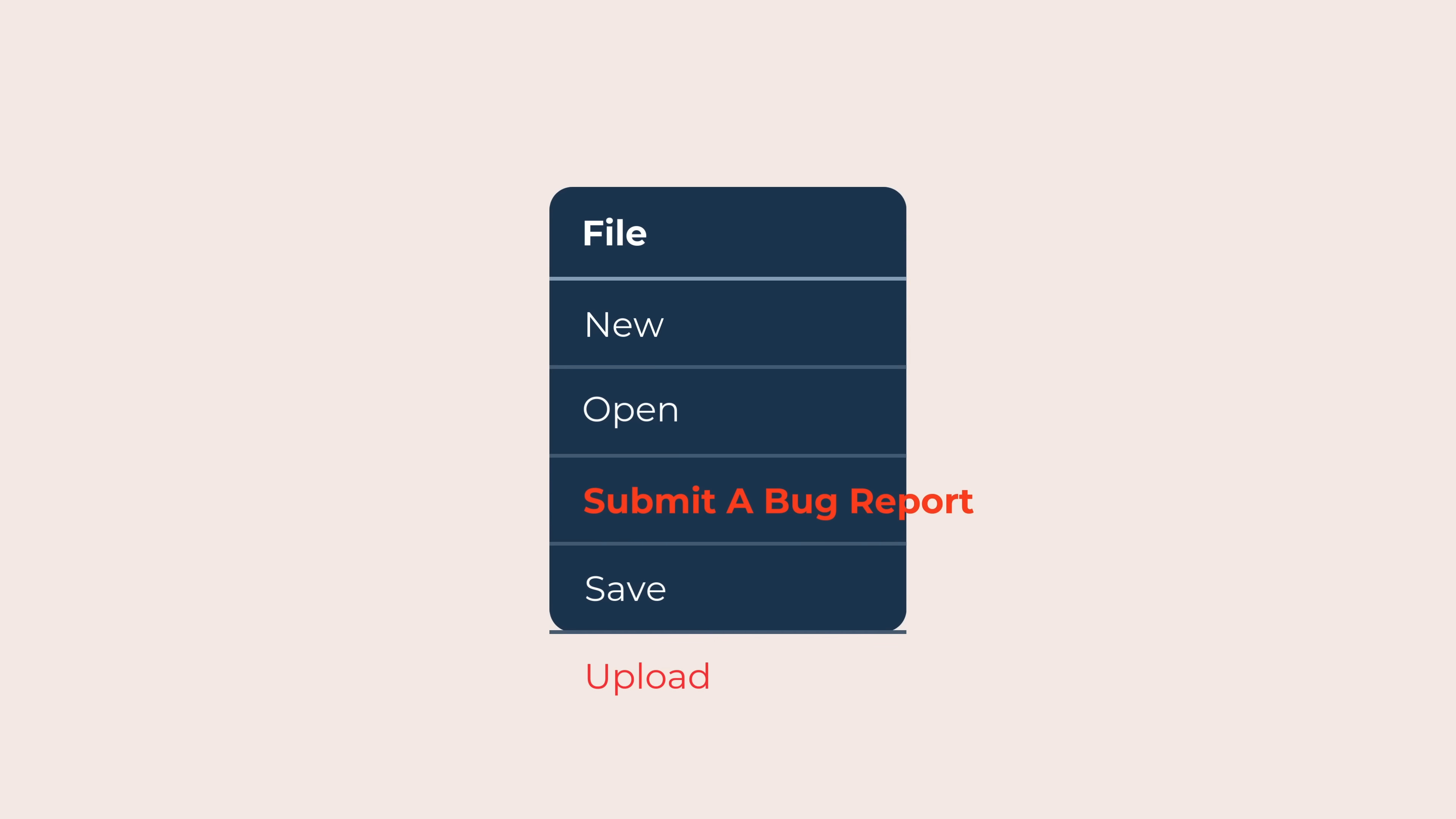
This introduction mentions you’d have to adjust everything by hand whenever you input any new data or needed to fit new children - it’d be a bunch of micromanagement for limited gain. But the jump to “flexible boxes” felt ill-motivated; instead of trying some of the fixes, it felt like a post-hoc justification for a particular mental model.
Furthermore, people like Casey Muratori - whatever you think of them - can seemingly produce whole game UIs in side-effectful per-frame renderer code without even creating any UI objects or layout structures.
It made me wonder if most people had truly, seriously tried to proceed without jumping straight for objectful UI frameworks. Perhaps most of us just assumed that all these indirections were doing us some service, and that they were an established natural solution.
I had a suspicion they weren’t, so I threw them out.
And you know what? After spending a few days prototyping it out roughly, I got to a point where I could write code every bit as ergonomic as modern reactive code, with the same compositional beauty and straightforward reasoning about state. It fully satisfies the type checker, it isn’t coloured by any particularly crazy syntax, and there’s no large data structures being constructed anywhere.
Here’s how it looks in practice. Unlike a box model, where every part of the UI is organised into parent/child relationships, a UI built in Perfection is instead a data flow, where a DAG is formed by dependencies of operations, not modelled as an explicit hierarchy concept.
// Written in Perfection, my new immediate-mode UI library

fn render_button(
	mut ctx: UiContext,
	label: String,
	on_activate: impl FnOnce()
) -> impl Paint {
	let text = render_text(label);
	let button_bounds = pad(text.bounds(), 4);

	let region = hit_region(ctx.key("region"), button_bounds);
	if region.was_clicked { on_activate(); }

	let (bg_colour, fg_colour) = match region.state {
		PointerState::Rest => (Colour::DARK_BLUE, Colour::WHITE),
		PointerState::Hover => (Colour::DARK_BLUE, Colour::YELLOW),
		PointerState::Press => (Colour::WHITE, Colour::BLACK)
	};
	let text = recolour(text, fg_colour);

	compose! [
		Quad::solid(button_bounds, bg_colour),
		region,
		text
	].bounded_by(button_bounds)
}

fn render_pause_menu(
	mut ctx: UiContext,
	screen_bounds: PxRect,
	current_view: Option<Views>,
	set_next_view: impl Fn(Option<Views>),
	game_state: &GameState,
	queue_action: impl Fn(Action)
) -> impl Paint {
	// The buttons can be directly composed, and no state
	// needs to be shuttled around at all.
	let buttons = &[
		render_button(ctx.key("resume"), "Resume the game", || {
			set_next_view(None);
			queue_action(Action::Idle(false));
		}),
		render_button(ctx.key("achieve"), "View achievements", || {
			set_next_view(Some(Views::Achievements));
		}),
		render_button(ctx.key("options"), "Game options", || {
			set_next_view(Some(Views::Options));
		}),
		render_button(ctx.key("quit"), "Quit to desktop", || {
			queue_action(Action::ExitGame);
		})
	];
	let buttons = vstack(buttons, 4);
	let buttons = align(buttons, screen_bounds, Some(0.5), Some(0.5));

	compose! [
		Quad::solid(screen_bounds, Colour::BLACK.opacity(0.5)),
		buttons
	]
}
This is my perfect UI library. It outsources almost everything to abstractions above it. There’s nothing left to take away.
Over the next three blog posts, I’m going to explore how I got there, justifying these three key pillars:
- Part 1 (this post): Using immediate mode to model an ultralight, object-free reactive cache invalidation scheme.
- Part 2: “Just draw it” - a composable shape algebra that’s simpler & more powerful than a strict UI hierarchy.
- Part 3: Unifying all OS event handling through the UI layer, emitting semantic inputs to the game engine.
But wait, you can’t do all that every frame!
It’s the most common argument against immediate-mode UI; that the performance is irredeemable. It’s only suitable for game engines, it must magically drain battery more, it’s some renderer hack, and all that. If you’re building “real UI”, you just need a traditional retained-mode UI framework, like a reactive signals library. At least, people say.
Let’s test that theory. First, let’s go over how each approach can cache data under the hood, because both architectures can be made to stably retain information over multiple frames.
Reactive signals are simple enough; they’re objects that are constructed once when the UI function is run, and then continue existing to respond to events thereafter. The library can store caches and book-keeping internally on the object:
-- Written in Fusion, my old reactive signals framework

-- How Fusion constructs a simple reactive signal object.
-- Slightly simplified. The object stores everything.
local function Value(initialValue)
	local self = setmetatable(
		{
			createdAt = os.clock(),
			dependentSet = {},
			lastChange = os.clock(),
			validity = "valid",
			value = initialValue
		},
		METATABLE
	)
	return self
end
That’s all there is to that. As long as the object stays live (foreshadowing), the state can be retained.
On the other hand, in immediate mode UI, the UI code runs all the time, so it’s not a stable place to store or remember things. The UI function itself can’t retain data on its own in this context.
Instead, the main loop of the program manually carries over a “context” object from one frame to the next, as the explicit owner of multi-frame state.
// Written in Perfection, my new immediate-mode UI library

let ctx = UiContext::new();

loop {
	ctx.next_frame();
	render_ui(ctx);
}
Then, each frame, you can refer to stable named storage locations within that context object. In the case of my library, Perfection, that’s done by building up a “path” to the location using ctx.key().
// Written in Perfection, my new immediate-mode UI library

fn render_ui(mut ctx: UiContext) {
	// We use .key() to name the storage location first.
	// Then, we can do things at that location.
	let my_number = ctx.key("my_thing").once(|| {
		print!("I only run once!");
		return 42;
	});

	dbg!(my_number) // prints: 42
}
.key() actually returns a new “nested” UiContext, so you can give each sub-function its own clean named UiContext.
// Written in Perfection, my new immediate-mode UI library

fn render_pause_menu(mut ctx: UiContext) {
	// path: /option_resume/
	render_option(ctx.key("option_resume"));
	render_option(ctx.key("option_exit"));
}

fn render_option(mut ctx: UiContext) {
	// path: /option_resume/button/
	render_button(ctx.key("button"));
}

fn render_button(mut ctx: UiContext) {
    // path: /option_resume/button/hit_region/
	render_hit_region(ctx.key("hit_region"));
}
Internally in the UiContext, you have two maps from keys to stored values. On frame N, you can write these named locations into one of the maps. Then, on frame N + 1, you flip the maps over - now you can refer to last frame’s map while building up next frame’s map, copying over anything you want to retain, and leaving out what you want to purge.
These are what I call “flip caches”. I discuss them more in my January post on them, as well as some extra background on a concept called “information loss” which motivates the choice of reactive signals and immediate mode as the starting points here. (It’s not central to anything in this post, happily.)
This is similar to what projects like React have done in the past, except React often leans on implicit keys based on call order; if you know about the “Rules of Hooks”, that’s why. Perfection is the same idea without the overcomplication the implicit rules provide: if it needs to be remembered, it deserves a key - no attempt to hide it.
So cool, each approach has a way of caching state if it needs to. That’s important to establish; immediate mode UI does not have to throw everything away every frame!
Two sides of one coin
So, back to this claim:
If you’re building “real UI”, you just need something retained, like a reactive signals library.
Having built both a reactive signal library and an immediate mode one, I disagree. Both are perfectly acceptable and on even footing with each other when you’re not strawmanning one or the other.
More foundationally, both approaches are two sides of the exact same coin, assuming both approaches are implemented properly and professionally. Both approaches try to treat UI as a function of state, and in fact, both try and keep your logic stateless, divorced of history. One is mechanically translatable to the other, and the distinction is entirely in the caching approach.
Let’s expose this fact by writing the same example code snippet in both.
Every derived reactive signal you write contains little islands of immediate-mode logic. The computation is always stateless and you expect it to always hold true. The framework just chooses to skip the computation when the inputs haven’t changed.
We do this because it makes it easy to reason about the chain of events that lead to a final value, without having to hold the whole history of the UI and all the state transitions in your head.
-- Written in Fusion, my old reactive signals framework

local itemName = scope:Value("Carrots")
local itemPrice = scope:Value(150)

local message = scope:Computed(function(use)
	-- Collect inputs...
	local name = use(itemName)
	local price = use(itemPrice)
	-- Run this when the inputs notify you of a change.
	return "Buy " .. name .. " for " .. price .. " coins"
end)

print(Fusion.peek(message)) -- prints: Buy Carrots for 150 coins
The way these reactive frameworks operate under the hood, is that they wire up objects to each other as you use() them. Those pathways are used to communicate change events, which are the things that cause the computation callback to re-run. As a result, you can avoid running the computation any more frequently than that.
As it turns out, an immediate-mode library can express exactly the same kind of cached computation. Look, you can even pattern-match it with your eyes.
// Written in Perfection, my new immediate-mode UI library

let item_name = "Carrots";
let item_price = 150;

// This is a utility function that makes caching
// nice and pleasant to write for us, just like Fusion.
let message = ctx.expensive(|get| {
	// Collect inputs...
	let name = get(item_name);
	let price = get(item_price);
	// Run this when the inputs appear to have changed.
	move |ctx| format!("Buy {name} for {price} coins")
});

dbg!(message) // prints: Buy Carrots for 150 coins
There are a few nuances worth digging into here, including a few things that will probably surprise the uninitiated - the first of which being that the inputs (item_name and item_price) are not objects, but are just plain data.
The reason why reactive frameworks wrap everything in objects, is to form that change-notification network we discussed before - a “reactive graph”. That’s how you know when to re-run the expensive computation.
Perfection doesn’t do this. Instead, it splits expensive computations into two halves; the first callback is called every frame to collect inputs with get() (allowing for dynamic/conditional gets), then the expensive part is returned as a second callback which may or may not be executed based on what you got.
// Expanded version of the above code snippet.
// You wouldn't write it this way for realsies,
// but it's useful for explanation.

// The callback for the "cheap" part.
// Runs every time the UI is evaluated.
let cheap_part = |get| {
	// Collecting all the inputs is super cheap.
	// If we get the same number of inputs, and they have
	// the same values, then assuming our expensive
	// computation is pure and deterministic, it must be
	// identical too.
	let name = get(item_name);
	let price = get(item_price);

	// The callback for the "expensive" part.
	// If all the get() stuff is equal, we don't run it,
	// and instead fetch the last result from memory.
	let expensive_part = move |ctx| {
		format!("Buy {name} for {price} coins")
	};

	expensive_part // Always returned.
};

let message = ctx.expensive(cheap_part);
Rust makes this very cheap to do, and presumably you’d only be caching things that are so expensive that any overhead from this split would be atomically small in comparison. You save the overhead from not doing object allocations, too.
So yeah, you don’t need a reactive graph or a bunch of objects in order to get something that feels exactly like lazy reactive signals. Immediate mode and reactive signals are implemented differently, but capable of expressing the exact same concepts.
I would actually argue on syntax alone that immediate mode makes these ideas much nicer to express, since it solves the biggest problems of reactive signals: since there are no objects, there’s no lifetime wrangling, and reactivity isn’t a viral annotation that spreads through your codebase like wildfire - it’s all plain inputs and outputs, no object wrappers. It’s why the example code I showed earlier looks so clean.
There’s a more subtle and under-discussed aspect, though.
UI lifecycle and reconstruction
A common consequence of reactive frameworks relying on constructed, region-allocated signal objects, is that re-running UI code means re-constructing all the objects. For example, consider this correct Fusion code:
-- Written in Fusion, my old reactive signals framework

-- Create a timer that smoothly increases from
-- the start of the program.
local timer = scope:Value(0)
everyFrame(function(dt)
	timer:set(Fusion.peek(timer) + dt)
end)

-- Drive a sine wave using the timer.
local wobble = scope:Computed(function(use)
	return math.sin(use(timer))
end)

-- Define a physically simulated follower that
-- will lag behind the sine wave with some inertia.
-- (i.e. this will depend on the object's own history)
local laggard = scope:Spring(wobble)
The Value, Computed and Spring objects are constructed once, which is good - the Spring in particular is initialised to wobble at first, but then over time can refer to its own internal history to keep track of its own position and velocity.
Now, consider why this very similar Fusion code does not work:
-- Written in Fusion, my old reactive signals framework

-- Same as above.
local timer = scope:Value(0)
everyFrame(function(dt)
	timer:set(Fusion.peek(timer) + dt)
end)

-- Same as above.
local wobble = scope:Computed(function(use)
	return math.sin(use(timer))
end)

-- All we did was wrap this in a Computed.
local laggard = scope:Computed(function(use)
	-- Every time `wobble` changes, this internal Spring
	-- object is re-created, so it has no memory of where
	-- it has been. So, it doesn't animate!
	return scope:Spring(use(wobble))
end)
This is a perfect illustration of how Fusion’s Computed objects break Tennent’s Correspondence Principle. By wrapping an expression in a cache, we unintuitively cause it to wipe all knowledge of its own memory. This is a direct artifact of tying all history state to the lifetime of particular objects. At a deeper level, it’s a conflation between the lifecycle of objects in the UI, and the lifecycle of the function that renders them - Fusion is only designed for UI functions to run once.
Of course, Perfection - being an immediate mode framework - is designed to run its UI functions more than once. This forces a decoupling of those two lifecycles, so instead of storing state in fragile objects, it has to be stored at a stable named location. So this example fully works, with or without the expensive cache - it’s totally transparent.
// Written in Perfection, my new immediate-mode UI library

// No need to manage this example timer ourselves,
// we are called every frame, so it just works.
let timer = current_frame.timer;

// Same wobble logic - just a sine wave.
let wobble = timer.sin();

// Option 1: without the cache
// Name a storage location "my_spring",
// and save a spring there.
let laggard = ctx.key("my_spring").spring(wobble);

// Option 2: with the cache
// It works exactly the same, because storage
// is decoupled completely from runs.
let laggard = ctx.expensive(|get| {
	let wobble = get(wobble);
	move |ctx| ctx.key("my_spring").spring(wobble)
});
(It’s worth mentioning that reactive signal frameworks could choose to do this too. As mentioned before, they’re two sides of the same coin. They just don’t, because it’s not the norm to name stable storage locations - they just use the object wrappers as storage.)
This property makes Perfection code a lot more fearless - instead of being precious about re-runs as a matter of correctness, it’s just a matter of performance. That frees you up to think about bigger issues, like…
The memory tragedy of the commons
Ever since the 90s, computation has outpaced the speed of memory accesses. To smooth over this pressure, modern CPUs tend to have caches that are physically closer to the chip. Any cold memory accesses that miss the cache take on the order of thousands of times longer than a “usual” ALU operation operating directly on available registers.
Of course, that’s a slight simplification - there’s actually multiple caches (L1, L2, L3…) at various distances from the chip. Closer caches like L1 are much faster, but also much smaller.
As a result of all this, you really want to be economical with CPU cache lines. Anything that loads new things in from memory, by necessity, will evict older cached items - first down to lower caches like L1->L2 or L2->L3, but eventually it’ll evict it entirely.
This is why caching things on modern computers isn’t always a win. If the computation is sufficiently trivial, or the memory sufficiently cold, you can end up in situations where recomputing the thing from scratch is many times faster than waiting for the previously computed answer to be retrieved from memory.
That’s the obvious takeaway, anyway. There’s actually a more subtle angle you should consider too, which is that even if something is locally faster to cache, you might not want to, because something else benefits from the cache more than you do. That is: the more things that do reads from memory, the more things that may be evicted from the caches. By the time you get to some critical cached computation, you may end up with a fully wiped-out cache, meaning that super-important cache read takes orders of magnitude longer.
By caching more things to get real, measurable local speedups, the pressure imposed by the whole procedure worsens, and raises the memory latency floor overall. It’s a tragedy of the commons. (I’ll call it TOTC.)
The worst thing about this kind of TOTC is that it is basically un-attributable by normal profiling done on a per-function basis. Your function can measurably get faster, it can measurably take less frame time, whatever. But your profiler would be lying by omission to you; silently, in the background, the whole procedure quietly ticks up in overall execution time, most nefariously in functions you aren’t even explicitly profiling, or which you assume take “constant time”.
This TOTC is why it’s so important to choose what parts of your UI you want to cache, and why it’s so important for UI libraries to have thin, straightforward caching logic. It’s also exactly the place where Fusion fails with its reactive signals; the common practice is to wrap all derived values in Computed, which carries a whole bunch of bulky caching logic and environment setup logic with it.
-- Written in Fusion, my old reactive signals framework

local itemName = scope:Value("Carrots")
local itemPrice = scope:Value(150)

-- There is no reason to cache such a simple inline
-- computation, but Fusion will cache it for us anyway.
local message = scope:Computed(function(use)
	return "Buy " .. use(itemName) .. " for " .. use(itemPrice) .. " coins"
end)
The only way to avoid it is to replace it with a plain closure, which still imposes some inherent overhead in Luau, which means you’re still competing for resources (though fewer).
-- Written in Fusion, my old reactive signals framework

local itemName = scope:Value("Carrots")
local itemPrice = scope:Value(150)

-- You can't remove the closure, because you need
-- to keep the use() calls in case it ends up in
-- a higher-up `Computed` somewhere.
local message = function(use)
	return "Buy " .. use(itemName) .. " for " .. use(itemPrice) .. " coins"
end
And of course, Fusion’s various UI lifecycle problems only compound this, forcing you to use Computed and its relatives in very particular ways to achieve correct behaviour.
By comparison, Perfection is a breath of fresh air. If you don’t want to spend limited cache resources on something cheap to recompute… just recompute it. It’s immediate mode. There are no viral annotations.
// Written in Perfection, my new immediate-mode UI library

let item_name = "Carrots";
let item_price = 150;
let message = format!("Buy {item_name} for {item_price} coins");
This gets towards one of the interesting things about the difference between reactive signals and immediate mode. The choice not to use objects in the latter isn’t just me wanting to avoid OOP, nor is it a debate about syntax. It’s really about a fundamental truth of code that adds these layers of indirection, and the way it behaves on the metal.
Proof in the pudding
I would hope by this point, I’ve shown mechanically that the distinction between retained-mode signals and immediate-mode flip caches are negligible. Any computation that can be cached in one, can be cached in the other. Any efficiency or inefficiency follows from norms, not from an inherent limitation of the possibility space.
But if you remain unconvinced, here are some of the most performance-sensitive production projects which use immediate mode, and experience none of the conjectured issues.
File Pilot
It’d be impossible not to lead with this. Using this file manager myself was a religious experience; I’ve never used a program so fast that hovering the buttons felt truly connected to my hand as I moved my mouse. It lets you scroll through your whole C drive as if it’s nothing.
It’s so fast that an internal Microsoft source claims it’s the new benchmark the in-box File Explorer is being measured against. That’s a glowing review for a UI that’s built with - supposedly - the “slower” option.
Blick
This one’s a new one, demoed at Better Software Conference, but it’s staggeringly performant and well-put-together. Funnily enough for this post, it’s even got endorsements from both Casey Muratori (who coined imgui) and Nic Barker (who made Clay)!
Just check out this clip of it absolutely eating up 30,000 clips for breakfast.
Video editors are some of the hardest pieces of software to make truly performant, so the dedication to fluidity is remarkable here. To say it’s competitive with Premiere and friends, is to give Premiere way too much credit.
Nomad Sculpt
This one’s notable because it runs on mobile hardware, which gives us a reference point for a complex bit of kit that’s not plugged into a wall. As it turns out; battery drain just isn’t a problem if you build it well.
It’s listed on Dear Imgui’s list of disclosed users and is generally a really cool app. There’s even a web demo if you’re curious.
Blender
Following the same train of thought, Blender has a huge presence in the 3D modelling world too, and it’s shown to be perfectly capable even for people just getting into modelling without workstation-level hardware.
In fact, it has a unique blend of immediate mode with damage redrawing, showing that immediate mode can be a perfectly principled solution even if you want to retain final pixels instead of refreshing them 144 times a second. Immediate mode logic can just be about solving lifecycle problems and keeping code simple!
Tracy
Profiles are one of the most data-dense UIs in existence, so it means something that one of the most popular and most performant ones runs on Dear ImGui. It renders timelines with millions of profiling zones at full framerate, completely smoothly. If ever there was proof that “running every frame” can scale incredibly well, well, here you go.
I use Tracy actively in the development of my voxel game Cavey and I have never, ever looked back. It’s brilliant and I wouldn’t ever skip an opportunity to sing its praises.
RemedyBG
Staying in the world of high-performance dev tools for a second; this commercial Windows debugger sells itself as a super-fast alternative to more traditional tools like the Visual Studio debugger. It refreshes nearly instantly despite being composed of dense data fields and tons of text to be truncated all the time.
A teaser for presentation
So - we’re doing immediate mode style UI. That means drawing the UI every frame. I want to introduce you to what the initial problem space looks like here, ahead of the next blog post.
Let’s bring it back to that Clay introduction video, and pretend like we’re beginners and just wrote a render_ui() function with a bunch of calls to directly draw things on the GPU, all with hardcoded coordinates.
fn render_ui(mut ctx: UiContext) {
	// Render a nice background.
	draw_quad(0, 0, 104, 120, Colour::DARK_BLUE);
	// Then, a bunch of labels stacked vertically.
	draw_text("File", 4, 4, Colour::WHITE);
	draw_text("New", 4, 28, Colour::WHITE);
	draw_text("Open", 4, 52, Colour::WHITE);
	draw_text("Save", 4, 76, Colour::WHITE);
	draw_text("Upload", 4, 100, Colour::WHITE);
}
As Nic predicted in the video, we can see this isn’t going to work with all these numbers to remember and keep in sync. But instead of bailing out to a library like Clay, let’s actually make an effort to do all those calculations ourselves and see how bad it gets.
Since we’re just stacking things on top of each other, we could make it a little less impossible-to-modify by keeping a running total of our position and adding onto it. We’ll also throw in a few other variable names, too.
fn render_ui(mut ctx: UiContext) {
	let text_pad = 4;
	let item_height = 16 + text_pad * 2;
	let menu_width = 104;
	let menu_height = 120;
	draw_quad(0, 0, menu_width, menu_height, Colour::DARK_BLUE);

	let mut top_of_item = 0;
	draw_text("File", text_pad, top_of_item + text_pad, Colour::WHITE);
	top_of_item += item_height;
	draw_text("New", text_pad, top_of_item + text_pad, Colour::WHITE);
	top_of_item += item_height;
	draw_text("Open", text_pad, top_of_item + text_pad, Colour::WHITE);
	top_of_item += item_height;
	draw_text("Save", text_pad, top_of_item + text_pad, Colour::WHITE);
	top_of_item += item_height;
	draw_text("Upload", text_pad, top_of_item + text_pad, Colour::WHITE);
}
And hey, that sure is a bunch of duplication. Maybe we should use a loop.
fn render_ui(mut ctx: UiContext) {
	let text_pad = 4;
	let item_height = 16 + text_pad * 2;
	let menu_width = 104;
	let menu_height = 120;
	draw_quad(0, 0, menu_width, menu_height, Colour::DARK_BLUE);

	let mut top_of_item = 0;
	for item in &["File", "New", "Open", "Save", "Upload"] {
		draw_text(item, text_pad, top_of_item + text_pad, Colour::WHITE);
		top_of_item += item_height;
	}
}
Okay, so the code is a little cleaner now. Some people, like Casey, do actually write some UIs pretty much like this - using incrementing variables and drawing as-you-go.
But by now, you can probably feel what Nic was saying. There’s still hardcoded stuff here, and we can’t fix that without solving some circular logic puzzles.
For example, it’s great that we implemented this automatic for-loop for the items, but we’ve still hardcoded the background. We have to draw the background before the text, so we need to know the width and height ahead of time. But also - we want the background to fit around the width and height of the text, which we haven’t rendered yet!
This is where most immediate mode UI schemes can start to feel a little weird or constrained, but it doesn’t have to be that way.
Join me in the next blog post, where we’ll start plowing directly through this problem and uncover a satisfyingly insightful shape algebra that lets us render arbitrarily complex immediate mode UIs in practice.